KYC with no data vs. KYC with too much data
I have worked on KYC and AML from two opposite ends.
A few years ago, I helped build a digital bank from scratch. It had no branches, no history and no customers, so everyone who signed up was a stranger.
Today, I work on KYC for a large, established bank, and the situation is reversed. The bank has years of transaction history for its clients, data from public registries, and AI agents that search the web for news about them. It is the same acronym, but the engineering work has very little in common.
When the bank knows nothing
A bank with no customers does KYC at a single moment: onboarding. The customer fills in a form and photographs their ID document, and that is all the information you get.
We didn't build the checks ourselves. We bought them, and the flow looked like this:
- The customer enters their personal details in the app.
- They upload a photo of their ID document.
- We send everything to a third-party KYC provider through its API.
- The provider runs document verification, face matching, and sanctions and PEP screening.
- We receive a report with the result and the evidence behind it.
- Our backend processes the response and approves the customer, rejects them or routes the case to a human reviewer.
The provider maintained document templates for every country, ran the fraud checks and kept the watchlists up to date. For a bank with zero customers, building that in-house would have made no sense.
We still owned the integration and every decision built on top of it. The provider returned a verdict and evidence; we decided which results to accept, what went to manual review, and what to store and for how long. That matters because the regulator holds the bank responsible, whichever provider it uses.
Most of the work was plumbing: asynchronous responses, a customer stuck in a pending state because a callback never arrived, a blurry photo, a name with diacritics that did not match the document. None of it is interesting, but it decides whether onboarding takes three minutes or three days.
The limitation of this model is that it only captures the customer on day one. Once the account is open, you know who the person is, but you have no idea what they will do with it.
When the bank knows too much
An established bank has the opposite problem. It has plenty of data about each client, and the hard part is working out which of it matters.
For an existing client, the bank can see:
- Transactions: where money comes from, where it goes and how those patterns change over time.
- The profile the client declared at onboarding, often years earlier.
- Public registries, including company records, beneficial ownership and insolvency proceedings.
- The web: news articles, court reports and anything else that mentions the client by name.
KYC at this stage runs for as long as the client stays with the bank. Clients are reviewed periodically, or when an event triggers a review, and each review asks whether the client still matches the profile on file and whether anything new has come up that warrants concern.
That is the work we hand to AI agents. One agent searches the web for adverse media, another checks public registries and a third compares transaction behaviour against the declared profile. An analyst reads the combined output and makes the decision.
Large volumes of unstructured text with a human reviewer at the end sound like a good fit for language models, and in many ways they are. The problems, though, are different from the ones at onboarding:
- Name matching. There are a lot of people called Jozef Novák, and the agent has to decide whether an article is about your client or someone else.
- Relevance. A ten-year-old article about a dispute that was settled long ago may or may not be a risk today.
- Nondeterminism. Run the same client through the system twice and you can get two different summaries.
- Explainability. An auditor will not accept "the model rated this client as medium risk" as a reason.
Because the data belongs to the bank, there is no provider to buy this from. The bank has to build it.
How the two compare
| Greenfield bank | Established bank | |
|---|---|---|
| When | Once, at onboarding | For as long as the client stays |
| Data | What the customer provides | Everything the bank has collected |
| Core question | Who are you? | Has anything changed? |
| Who builds it | The provider | The bank |
| Hard part | Integration, UX and edge cases | Judgment, noise and consistency |
| Failure mode | A legitimate customer is stuck or rejected | Real risk is buried in noise |
Onboarding KYC is an integration problem with predictable outcomes: you call an API, handle a known set of states and move on. Ongoing KYC asks for judgment on messy, incomplete evidence. Language models help most with that kind of work, and that is also where their mistakes are hardest to spot.
Lessons learned
- At onboarding, buy the checks and put your effort into the integration and the decisions around it.
- With existing clients, most of the work is filtering. The useful question is what to leave out of the analyst's view.
- Keep a human in the loop who actually reviews the output. The agent gathers and summarises; the analyst decides.
- Define what a correct output looks like before you build. Without that definition you cannot test the agent, and you cannot tell a bug from intended behaviour.
- Store the evidence behind every decision, such as a link, a transaction or a registry record, so you can show it later. A score on its own is not enough.
This is the first post in a series on KYC. The next ones cover integrating a KYC provider, adverse media screening with AI agents, transaction data as a KYC signal, and testing a language model that rates customer risk.

the state of .net sdks for ai apis: official, autogenerated, or missing
i build .net clients for ai apis, so i keep a running map of which providers actually support .net developers and which leave them hand-rolling http. the short version: "no .net sdk" is no longer the main problem. the main problem now is autogenerated .net sdks that technically exist but nobody enjoys using.
here's the field, in three buckets.
bucket 1: official, hand-maintained (the good ones)
these vendors treat .net as a first-class citizen. if you're on one of these, you're fine.
- OpenAI — official .net sdk, microsoft-backed. first-class.
- Anthropic — official c# sdk (anthropic on nuget). recent, real.
- Azure OpenAI — microsoft's own, obviously excellent.
- Deepgram — official deepgram-dotnet-sdk, targets net6/7/8. voice ai done right for .net.
- Qdrant — official .net client for the vector db.
- Pinecone — official .net sdk, microsoft-announced, wired into semantic kernel.
takeaway: the biggest names have closed the gap. good for developers, not a market for me.
bucket 2: autogenerated or experimental (the real opportunity)
these have a .net client, but it's machine-generated from an openapi spec (often by the community
tryagi project) or, increasingly, ai-generated by the vendor themselves. they compile. they're also
not idiomatic, thinly tested, and rough where the api gets interesting (agents, streaming, wire-format
quirks). enterprise .net teams feel the difference immediately.
- Cohere — .net via tryagi autogen; no hand-crafted company client.
- Tavily — tryagi autogen.
- Groq — tryagi autogen (and openai-compatible, so most people just use the openai sdk).
- Mistral — community + tryagi for chat; nothing official, and nothing covered the agents api until
i built Mistral.Agents.Net. - Apify — an official .net client that the vendor openly labels "experimental, ai-generated and
ai-maintained." decent, but the label says it all. - ElevenLabs — official sdks for python, ts, kotlin, swift; .net is community only, and the realtime
agents layer wasn't covered until ElevenAgents.Net.
takeaway: this is the new gap. the sdk exists, but it's autogen. "you have a .net sdk" and "your .net
sdk is good" are different sentences, and enterprise buyers notice.
bucket 3: missing or community-only
no official .net at all — just a community package of varying quality, or nothing.
- Together AI — no official .net.
- Cartesia — no .net.
- Firecrawl — community / autogen only.
- Plaid — node/python/ruby/java/go official; no official .net (community Going.Plaid). and this is
fintech, where the .net enterprise audience is huge. - Polygon.io — market data; no official .net.
- Vapi / Retell / Hume / Browserbase — mostly missing.
- AssemblyAI — special case: shipped an official c# sdk, then discontinued it in april 2025. .net
users who adopted it are now on an unmaintained client. the clearest signal of all that .net gets
treated as an afterthought.
takeaway: still real gaps, especially in fintech and the newer voice/agent startups whose enterprise
customers are exactly the .net crowd — and vendors who shipped a .net sdk and then walked away.
the thing nobody's saying
the industry quietly decided that "generate a .net sdk from the openapi spec" equals "support .net."
it doesn't. autogenerated clients handle the boring 80% and fall apart on the 20% that matters — the
agentic surfaces, the streaming, the wire-format quirks you only find by running against the live api.
(mistral's agents api returns function-call arguments as a json string, not an object. no generator
catches that. you find it on the first real call, in production.)
if you're a vendor with a python-first api and an autogenerated .net client, your enterprise .net users
are the ones paying for that gap — in time, in bugs, in a worse first impression than your python users
get. that's fixable.
i hand-craft production .net clients and mcp servers for ai apis — idiomatic, live-verified, documented.
if your .net story is a bucket-2 or bucket-3 entry, let's talk.
building enterprise multi-agent workflows in .net with mistral
most people know Mistral for its chat models. the part i find more interesting for enterprise work is the Agents API: persistent agents with instructions and tools, stateful conversations you can resume, built-in connectors (web search, code interpreter, document library), and handoffs so one agent can delegate to another.
the .net story stops short of this. the community sdks (tghamm's is genuinely good) cover chat completions, embeddings and function calling. they don't cover the agentic layer. so if you're a .net shop that wants to build a multi-agent workflow on mistral, you're writing raw http. i didn't want to, so i built Mistral.Agents.Net. here's the design and the one wire-format detail that cost me a debugging session.
agents, not just completions
a chat completion is stateless: you send messages, you get a reply, you manage all the history yourself. an agent is a stored object with instructions and tools, and a conversation is a stateful thread you can continue by id. that difference matters for enterprise workflows, where a "session" spans many turns and you want the platform to hold the state.
var agent = await client.CreateAgentAsync(new CreateAgentRequest
{
    Model = "mistral-medium-latest",
    Name = "Financial Analyst",
    Instructions = "Use the code interpreter for math and web search for current facts.",
    Tools = { AgentTool.CodeInterpreter(), AgentTool.WebSearch() },
});

using var turn = await client.StartConversationAsync(new StartConversationRequest
{
    AgentId = agent.Id,
    Inputs = "what was 15% of last quarter's revenue if it was 12.4M?",
});
Console.WriteLine(turn.OutputText);
the response isn't a single message. it's a list of outputs: tool executions, message chunks, function calls, handoffs. the library gives you OutputText for the common case and Outputs for the raw stream, plus a Root JsonElement escape hatch for anything the typed model doesn't cover yet. same philosophy i used for the serpapi and elevenlabs clients: typed where it helps, raw where you need it.
handoffs: one agent delegating to another
the enterprise-interesting feature is handoffs. you give an agent the ids of other agents it may delegate to, and the platform routes work between them.
var researcher = await client.CreateAgentAsync(new CreateAgentRequest
{
    Model = "mistral-medium-latest",
    Name = "Research Agent",
    Tools = { AgentTool.WebSearch() },
});

var analyst = await client.CreateAgentAsync(new CreateAgentRequest
{
    Model = "mistral-medium-latest",
    Name = "Financial Analyst",
    Handoffs = new List<string> { researcher.Id! }, // delegate research
    Tools = { AgentTool.CodeInterpreter() },
});
ask the analyst a question that needs current market data and it hands off to the researcher, which uses web search, and the answer comes back through the analyst. you orchestrate multiple specialized agents without writing the routing yourself.
your own code as a tool
built-in connectors are great, but enterprise value is in your private data. a function tool exposes your c# to the agent: it decides when to call, you run it, you return the result.
request.Tools.Add(AgentTool.FunctionTool(FunctionDefinition.FromJsonSchema(
    "get_internal_metric", "Returns a private company metric.",
    """{"type":"object","properties":{"name":{"type":"string"}}}""")));
then, when the agent calls it:
foreach (var call in turn.FunctionCalls)
{
    using var args = call.ParseArguments();
    var result = LookUp(call.FunctionName!, args.RootElement);
    using var next = await client.SubmitToolResultAsync(turn.ConversationId!, call.ToolCallId!, result);
}
i tested this end to end: asked "what is 15% of our q3 revenue?", watched the agent call get_internal_metric, feed the private number back, and compute 15% with the code interpreter. the whole loop, from .net.
the detail the docs don't tell you
here's the debugging session. the docs show function-call arguments as a json object. the live api returns them as a json string — a stringified object you have to parse. my first live run threw element has type 'String' the instant the agent called a function, because i was calling GetProperty on what i thought was an object.
this is a common llm-api quirk (openai does the same), but it's exactly the kind of thing you only learn by running against the real service, not by reading the reference. so the library handles it for you:
public JsonDocument ParseArguments()
{
    var v = Arguments;
    return v.ValueKind switch
    {
        JsonValueKind.String => JsonDocument.Parse(string.IsNullOrEmpty(v.GetString()) ? "{}" : v.GetString()!),
        JsonValueKind.Object or JsonValueKind.Array => JsonDocument.Parse(v.GetRawText()),
        _ => JsonDocument.Parse("{}"),
    };
}
ParseArguments() normalizes both forms, so your code never sees the difference. every wrinkle like this that the library absorbs is a wrinkle your users don't hit.
what's real
agents, conversations, connectors, handoffs and function tools are all live-verified against the real api — the revenue demo above actually runs. the library is net8.0, zero dependencies, async-first with cancellation, typed requests with a raw escape hatch, and an offline test suite that replays captured api frames (including the string-arguments case) so ci needs no key or credits.
it's on nuget as Mistral.Agents.Net and the source is on my github. .net is a large enterprise audience for agentic ai and right now it has no official path to mistral's agents platform. if you're at mistral and reading this: happy to help close that gap properly.
Source and NuGet package: github.com/ivanjurina/mistral-agents-dotnet · nuget.org/packages/Mistral.Agents.Net
giving a .net app a voice: building on the elevenlabs agents platform
ElevenLabs is best known for text to speech, but the thing i find most interesting is ElevenAgents: you configure an agent with a prompt, a voice and some tools, and it handles the whole voice loop. speech to text, the llm, turn-taking, interruptions, text to speech. you just open a websocket and talk.
they ship sdks for python, typescript, kotlin and swift. nothing for .net. so if you want to build a voice agent from c#, you're hand-rolling the websocket protocol. i didn't want to do that every time, so i built ElevenAgents.Net. here's what the protocol actually looks like and the two design decisions that mattered.
the protocol is a typed event stream
after the handshake, the agent sends a conversation_initiation_metadata event with a conversation id and the negotiated audio formats. then it's a stream of json events, each with a type: user_transcript, agent_response, audio, interruption, vad_score, ping, client_tool_call. you send events back: user_message, user_audio_chunk, client_tool_result, pong.
the naive way to model this is a big enum and a switch. the problem is the event list is long and still growing, and you don't want your library to break the day elevenlabs adds an event type. so: typed classes for the events people actually handle, and a raw JsonElement on the base class for everything else.
await foreach (var evt in conversation.ReceiveEventsAsync())
    using (evt)
        switch (evt)
        {
            case AgentResponseEvent r: Console.WriteLine($"agent: {r.Text}"); break;
            case UserTranscriptEvent t: Console.WriteLine($"you: {t.Transcript}"); break;
            case UnknownEvent u: Log(u.Raw); break; // future event types still usable
        }
UnknownEvent.Raw means a new server event is never a breaking change. you can read it today and i can add a typed wrapper later without anyone's code changing.
two protocol chores the library should just do
two things in the protocol are pure mechanics that no caller should have to think about.
first, ping/pong. the server sends ping events with an id and expects a matching pong for latency measurement. forget it and the connection looks dead. so the library answers pings itself, before the event is even handed to you.
second, client tools. this is the good part. an agent can be configured with "client tools", and mid-conversation it emits a client_tool_call event: run this function with these parameters and give me the result. that's how a voice agent does something real instead of just talking. the library lets you register a handler and wires up the response frame:
conversation.RegisterTool("get_order_status", async (parameters, ct) =>
{
    var id = parameters.GetProperty("orderId").GetString();
    var order = await orders.GetAsync(id, ct);
    return $"Order {id} is {order.Status}.";
});
when the agent calls the tool, your code runs and the result is spoken back. if your handler throws, the library reports it as a tool error instead of dropping the turn. this is stock async-with-cancellation c#, which is the whole point: it should feel like the rest of your codebase, not like a protocol you're fighting.
the payoff: your existing .net code, now with a voice
here's the part i actually built this for. if you already use Semantic Kernel, you have plugins: c# methods decorated as kernel functions. those are exactly what a voice agent's tools want to be. so there's a companion package that maps every kernel function to an elevenlabs client tool in one line:
var kernel = Kernel.CreateBuilder().Build();
kernel.Plugins.AddFromType<OrdersPlugin>("orders");

await using var conversation = await AgentConversation.ConnectAsync(
    new ConversationOptions { AgentId = agentId });

KernelToolBridge.Register(conversation, kernel); // every function is now callable by voice
the agent handles speech, the model and the voice. your business logic runs when the model decides it needs it. the same OrdersPlugin you'd expose to a text chat agent now works over a phone call, and you wrote it once.
what's real and what's next
the realtime client, the event model, ping/pong, client tools and the semantic kernel bridge are all live-verified against a real agent: i asked a voice agent "what's the status of order 1234?" and watched it call my c# method and speak the result back. audio streaming and webrtc are modeled from the docs and next on my list to exercise end to end. the library is net8.0, zero dependencies in the core, async-first with cancellation everywhere, and has an offline test suite that replays captured protocol frames so ci doesn't need network or credits.
one gotcha worth documenting, because it cost me a debugging session: the websocket serves the published version of your agent, not your draft. add a client tool, and until you hit publish, the live conversation still runs the old config with no tools. the agent will even narrate "let me check that" and then do nothing, because it was never told the tool exists. publish, and it works.
it's on nuget as ElevenAgents.Net and ElevenAgents.Net.SemanticKernel, and the source is on my github. .net is a big audience for voice agents, enterprise contact-center teams especially, and right now that audience has no official path onto this platform. if you're at elevenlabs and reading this: happy to help close that gap properly.
what a 2019 api client teaches you about modern .net
i've been playing with SerpApi lately. nice service. one GET request and you get structured json for google, bing, maps, news, shopping and about a hundred other search surfaces. captchas and layout changes handled for you. their python and ruby stories are strong. their .net story is a time capsule.
the official google-search-results-dotnet package was written around 2019 and it shows. Hashtable parameters. Newtonsoft.Json. a synchronous api that blocks on Task.Result. not a knock on SerpApi, every company has a long tail of sdks. but it makes a great case study. the distance between "working 2019 c#" and "good 2026 c#" is exactly the stuff that bites people in production. so i did two things. sent a set of prs to the official library, and built a modern client from scratch (serpapi-dotnet). here's what changed and why it matters.
1. sync-over-async is a deadlock waiting for a synchronization context
the original core looks like this:
Task<string> queryTask = createQuery(uri, parameter, jsonEnabled);
queryTask.ConfigureAwait(true);   // does nothing here, by the way
return queryTask.Result;
two problems. first, Task.Result wraps any failure in an AggregateException. callers catch (SerpApiSearchException) and miss. second, blocking on a task that resumes on a captured context deadlocks classic asp.net and ui apps. the ConfigureAwait(true) on a task variable (not an await) is a no-op. a hint that the intent was understood but the mechanics weren't.
the fix when you must keep a sync api for compatibility: GetAwaiter().GetResult(), which rethrows the original exception, plus ConfigureAwait(false) on every await inside the library. the real fix: expose GetJsonAsync(CancellationToken) and let callers be async end to end. my pr does both without breaking the existing surface.
2. catch (Exception ex) => throw new X(ex.ToString()) destroys the stack
the original wraps every failure like this:
catch (Exception ex)
{
    throw new SerpApiSearchException(ex.ToString());
}
stringifying the exception into a message means no InnerException, no type to catch on, and cancellation gets swallowed into a generic error. the modern pattern: let OperationCanceledException flow untouched, wrap transport errors with the original as InnerException, and carry the http status code on your exception type. callers can then tell a 401 from a 429 without parsing strings.
3. Hashtable to typed request with an escape hatch
Hashtable is pre-generics .net. the interesting design question is what replaces it, because SerpApi has dozens of engines with different parameters. a rigid typed model can't cover them all. a plain Dictionary<string,string> gives up on discoverability. the answer is both:
var request = new SearchRequest
{
    Engine = SearchEngine.GoogleNews,
    Query = "dotnet 9",
    Location = "Prague, Czechia",
    AdditionalParameters = { ["so"] = "1" },   // anything engine-specific
};
common parameters are typed and documented. everything else passes through. same philosophy on the response side: typed accessors for organic_results and friends, and a raw JsonElement Root for the long tail of answer boxes and knowledge graphs.
4. Newtonsoft to System.Text.Json source generation
dropping Newtonsoft isn't about fashion. with [JsonSerializable] source generation you get reflection-free deserialization that's trim-safe and native-aot-compatible. the library ends up with zero external dependencies. for an sdk, every dependency you don't take is a diamond-dependency conflict your users don't have.
one real-world wrinkle worth showing: SerpApi's local_results is sometimes an array and sometimes an object containing a places array, depending on the engine. that's the kind of thing you only learn by reading actual responses. handle it in the library so your users never see it.
5. new HttpClient() per instance, or bring your own
the 2019 client news up its own HttpClient. in 2026 the library should accept one. that's what makes it work with IHttpClientFactory, polly resilience pipelines, and unit tests with a fake HttpMessageHandler. ship a di package with services.AddSerpApi(...) and an ISerpApiClient interface, and testing a search feature no longer requires mocking http at all.
the payoff: a web-grounded agent in 30 lines
the reason i care about search apis in .net at all is ai agents. every llm's knowledge stops at its training cutoff. search grounding fixes that, and everyone does it in python. with a modern client, the c# version is a Semantic Kernel plugin:
public sealed class SerpApiSearchPlugin(ISerpApiClient client)
{
    [KernelFunction("search")]
    [Description("Searches the web and returns the top results.")]
    public async Task<string> SearchAsync(string query, CancellationToken ct = default)
    {
        using var result = await client.SearchAsync(new SearchRequest { Query = query }, ct);
        return string.Join("\n", result.OrganicResults.Select(r => $"{r.Title} - {r.Link}\n{r.Snippet}"));
    }
}
register it, enable automatic function calling, and the model decides when to search. the full sample, a working console agent, is in the repo.
takeaways
if you maintain an api client, the 2026 checklist is short. async-first with CancellationToken. exceptions that preserve their cause. accept an external HttpClient. source-generated System.Text.Json. typed requests with an untyped escape hatch. an interface for testability. none of it is exotic. it's just the accumulated lessons of a decade of .net moving on.
the prs to the official library and the full serpapi-dotnet source are on my github. if you're at SerpApi and reading this: i'd love to help you tell this story to .net developers properly.
replace bing grounding in azure ai foundry with serpapi!
i needed web search in an ai agent. sounds simple. it's not anymore.
microsoft killed the standalone bing search api in august 2025. if you had an app calling it, it just stopped working. the official replacement is "grounding with bing search" inside azure ai foundry. i tried it, got frustrated, and ended up with serpapi instead. here's why.
the foundry way
you create a bing grounding resource in azure, connect it to your foundry project, add it as a tool to your agent. the agent decides when to search, bing returns results, the model writes the answer with citations.
setup is quick. that part is fine.
but you never see the raw search results. they go straight into the model and you only get the final answer out. no urls to cache. no snippets to filter. no way to log what was actually retrieved. it's a black box.
and you pay premium for that box. around 35 dollars per 1000 grounding transactions, plus model tokens on top. the old bing api was 7 to 18 per 1000. so the replacement costs 2 to 5 times more than the thing it replaced, and gives you less control.
also, it only works inside foundry agent service. want the same search in a console app, an azure function, a background job? you can't. it's not a search api, it's an agent feature.
the serpapi way
serpapi is a search api. you call it, you get structured json back. titles, urls, snippets, knowledge graph, related questions, everything on the page. bing is one of the engines, but you also get google, duckduckgo, youtube, maps and a bunch of others through the same interface. switching engines is changing one parameter.
you own the retrieval step. cache results, filter domains, rerank them, log everything for later, feed them to any model you want. or skip the model entirely and just use the data.
in .net with semantic kernel it's one plugin function:
[KernelFunction, Description("search the web")]
public async Task<string> SearchAsync(string query)
{
    var url = $"https://serpapi.com/search.json?engine=bing&q={Uri.EscapeDataString(query)}&api_key={_apiKey}";
    var response = await _http.GetStringAsync(url);
    return response;
}
that's it. the model calls it as a tool. i decide what happens with the results.
a few things i didn't expect to like as much as i did:
the playground. you build your query in the browser, see the parsed json live, then copy the exact request. i had a working query before writing a single line of code.
the docs. every engine, every parameter, every response field documented with examples. after fighting azure docs that describe three different versions of the same service, this felt unreal.
the parsing is their problem. serps change layout all the time. i don't maintain any of that. the json contract stays stable, they handle the rest. they even run a legal us shield for their customers, which tells you how seriously they take this being a real product and not a weekend scraper.
the math
foundry bing grounding: ~35 dollars per 1000 searches, results locked inside the agent.
serpapi: 75 dollars a month for 5000 searches, so 15 per 1000. less than half the price, and you get the raw data.
so microsoft's option costs more and returns less. that's the whole comparison, really.
when foundry grounding still makes sense
if you're building a quick chat demo fully inside foundry agent service and never need to see the results, the built in tool is less code. that's the one scenario. everywhere else i'd rather own the search layer.
my take
microsoft took a simple api, made it more expensive, and locked the results inside their agent service. i get why, they want you in foundry.
but search results are data. i want them as data. one function, structured json, any engine, half the price. serpapi it is.
Lenduck — SME Financing Marketplace
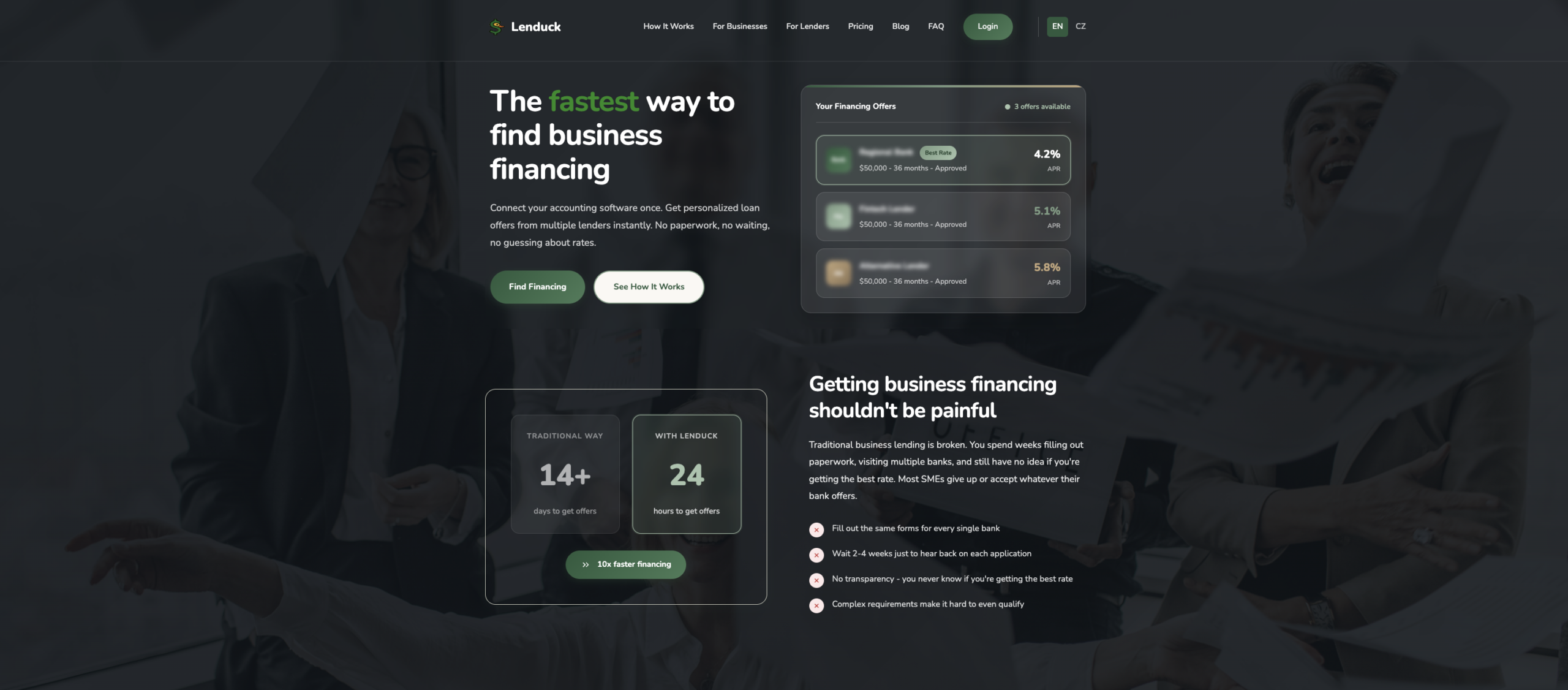
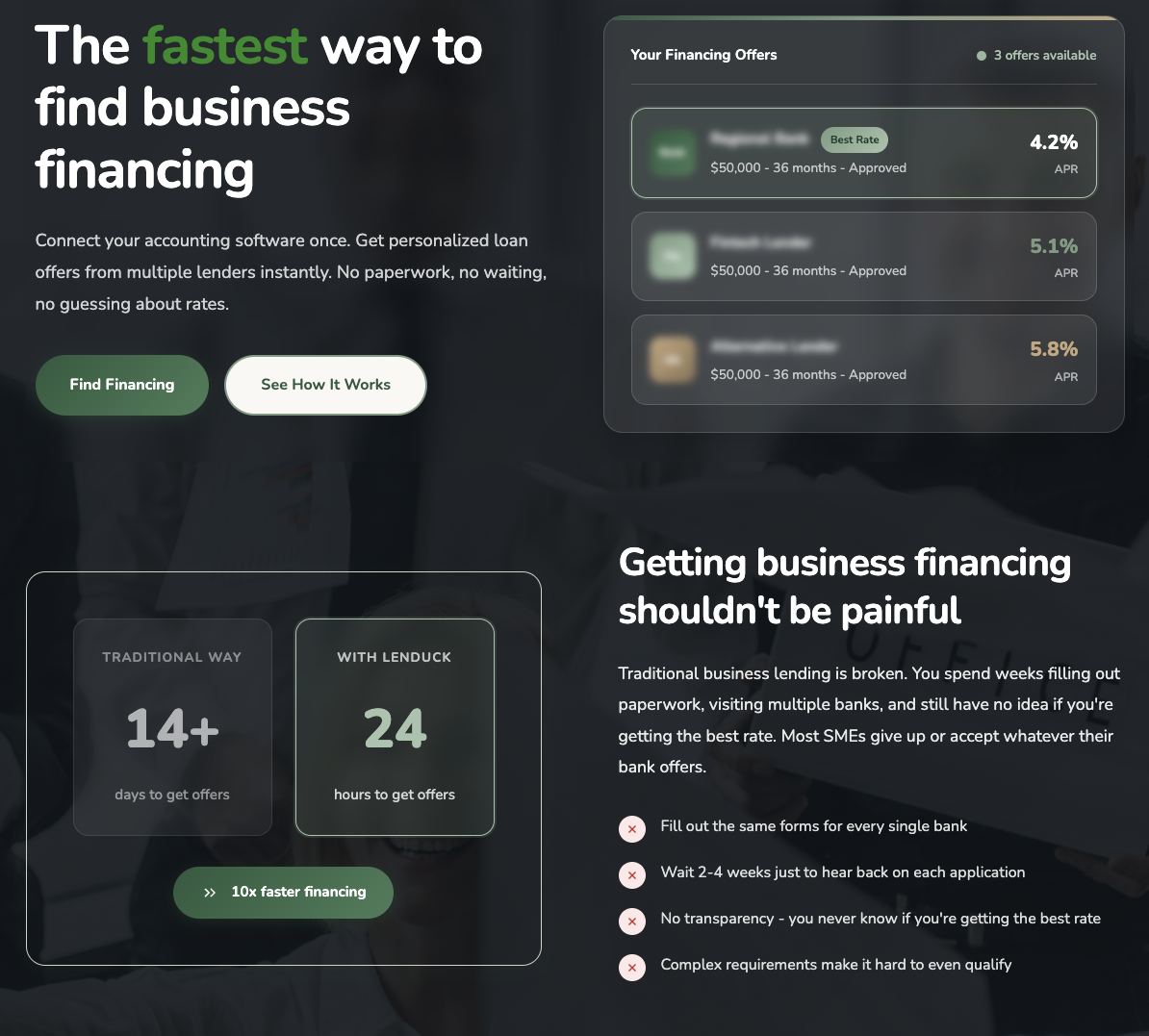
Getting a business loan is painful.
You visit your bank. They ask for two years of financials. You wait three weeks. Then you repeat at the next bank. And the next.
Most SMEs just accept whatever their bank offers. Not because it's the best deal. Because finding out is exhausting.
I built Lenduck to fix that.
The idea
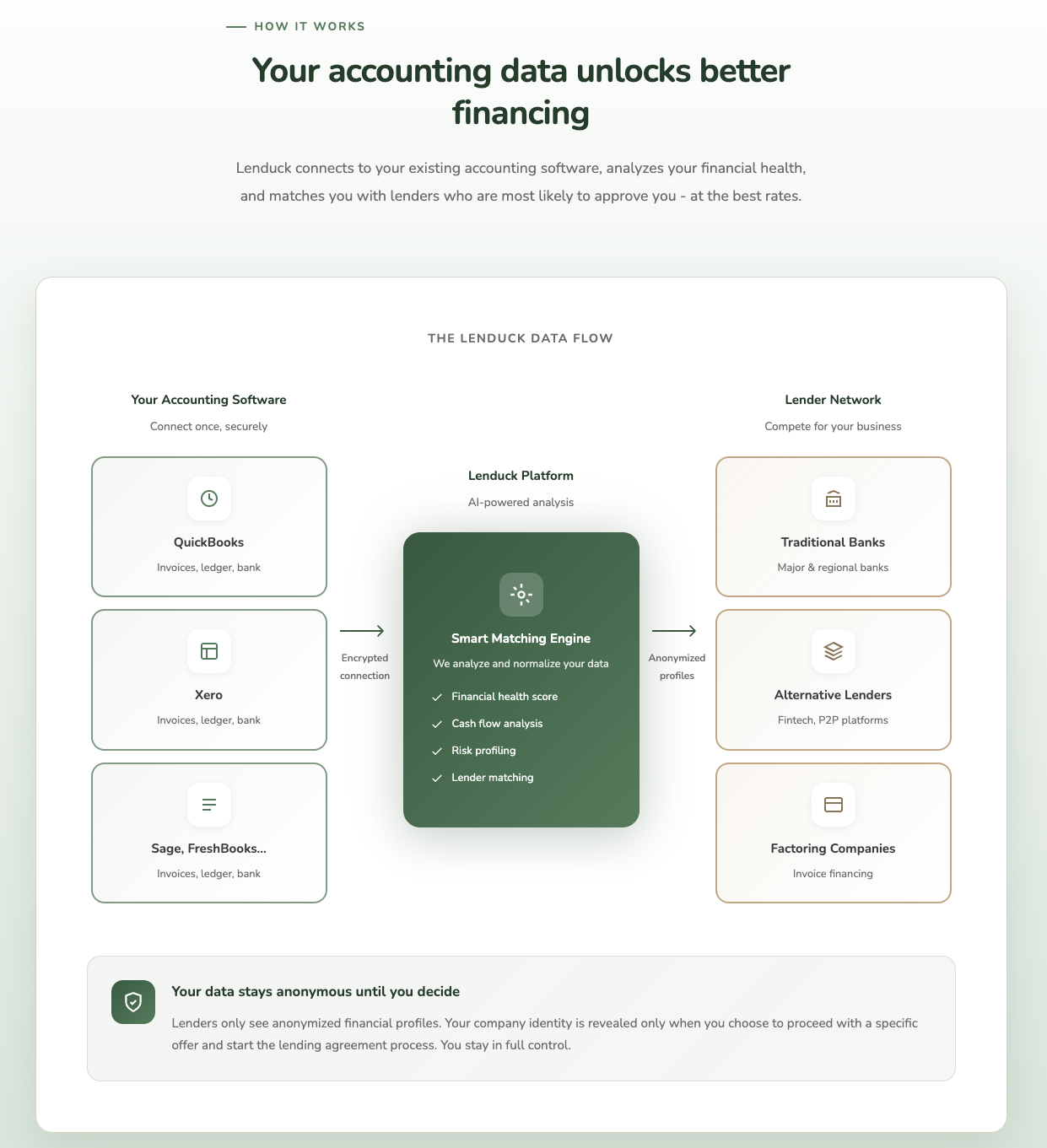
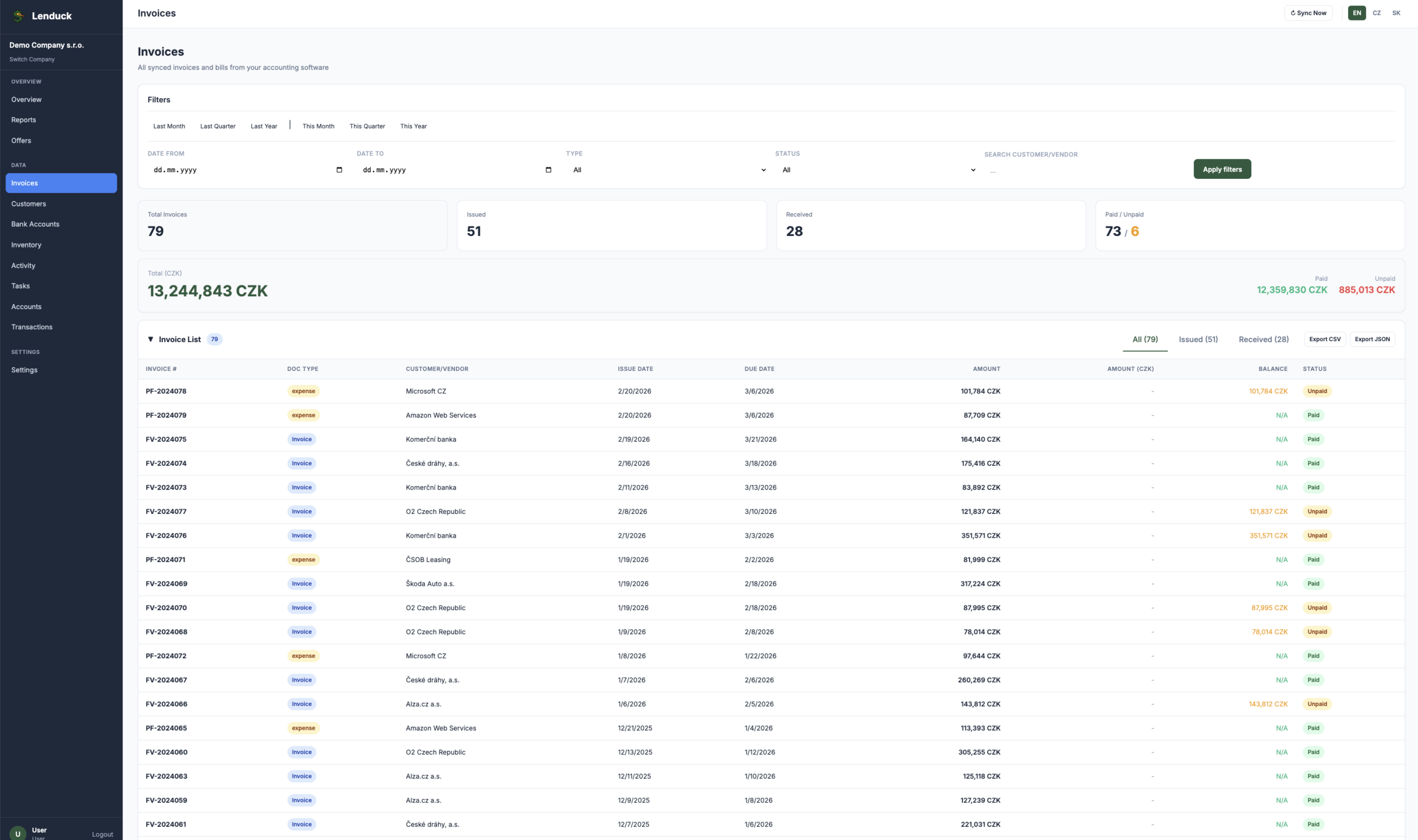
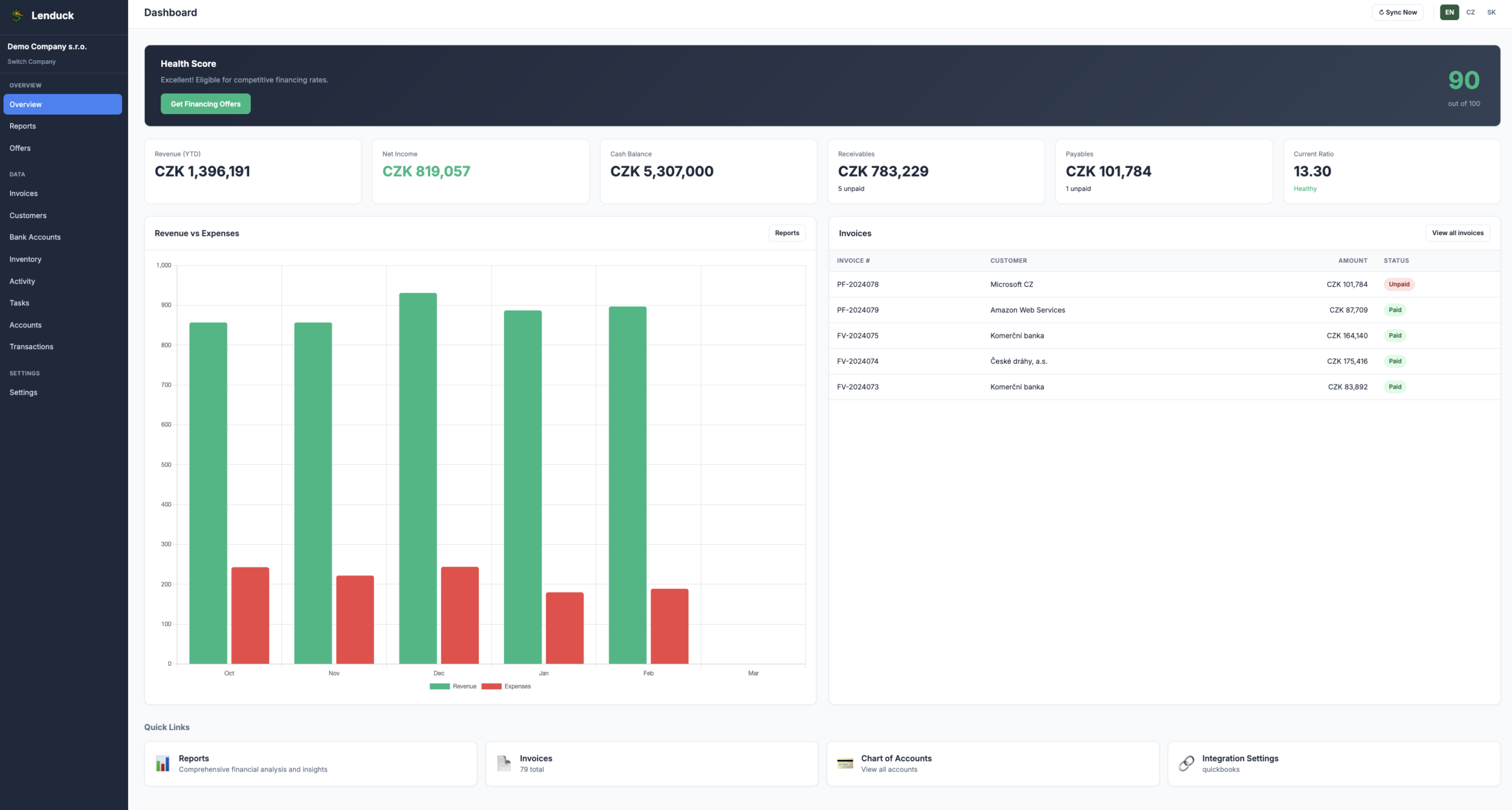
Your accounting software already has everything a lender needs to make a decision. Revenue, cash flow, invoices, margins. It's all there. Lenduck just connects the dots.
Connect QuickBooks, Xero, Sage, FreshBooks or Fakturoid once. We analyze your financials, build an anonymized profile, and send it to lenders who actually want your business. You get multiple offers in 24 hours. Side by side. Compare APRs, terms, fees. Pick the best one.
No paperwork. No repeating the same forms. Free for businesses, forever.
How it works
- Create account. Just an email.
- Connect your accounting software via OAuth. Read-only access, we can't touch your data.
- AI analyzes your revenue trends, cash flow, margins, receivables. Takes seconds.
- Lenders see an anonymized financial profile. They compete for your business.
- You pick an offer. Funds arrive in 24-48 hours.
Your company identity is never revealed until you explicitly choose to proceed with a specific lender.
What types of financing
Term loans, lines of credit, invoice factoring, equipment financing, revenue-based financing. Most lenders on the platform work with businesses from ~$100k annual revenue.
For lenders
Pre-qualified leads with verified financial data already attached. No manual document collection. Pay only when a deal is funded. Better conversion, lower acquisition cost.
Why I built it
Years in fintech. Banking, digital bank builds, financial SaaS. The SME lending problem kept coming up everywhere.
Banks are slow because underwriting is manual. Businesses give up because applying everywhere is painful. Nobody wins.
Accounting data changes that. If you can see real cash flow, you can make fast and accurate decisions. Lenduck is the pipe.
What's next
Czech and Slovak accounting software integrations on the roadmap. Pohoda, Money S3, Flexibee. Central Europe is the focus.
Check it out at lenduck.com. Feedback welcome.
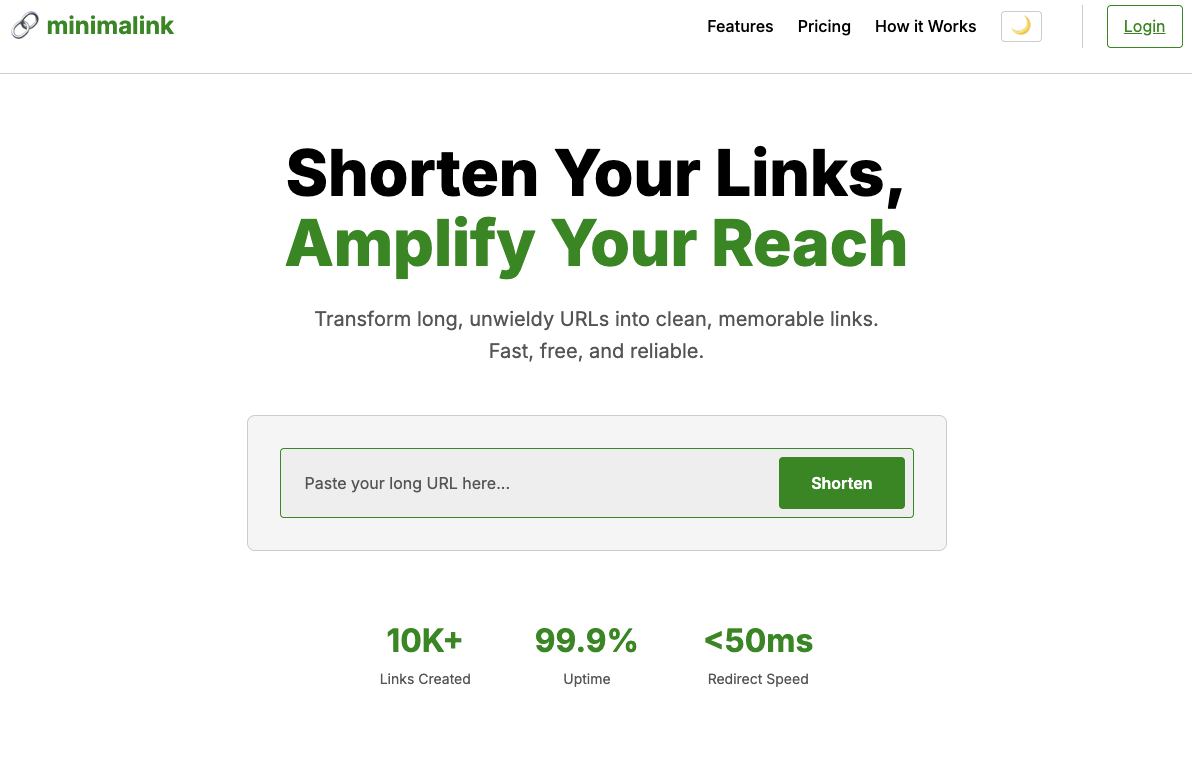
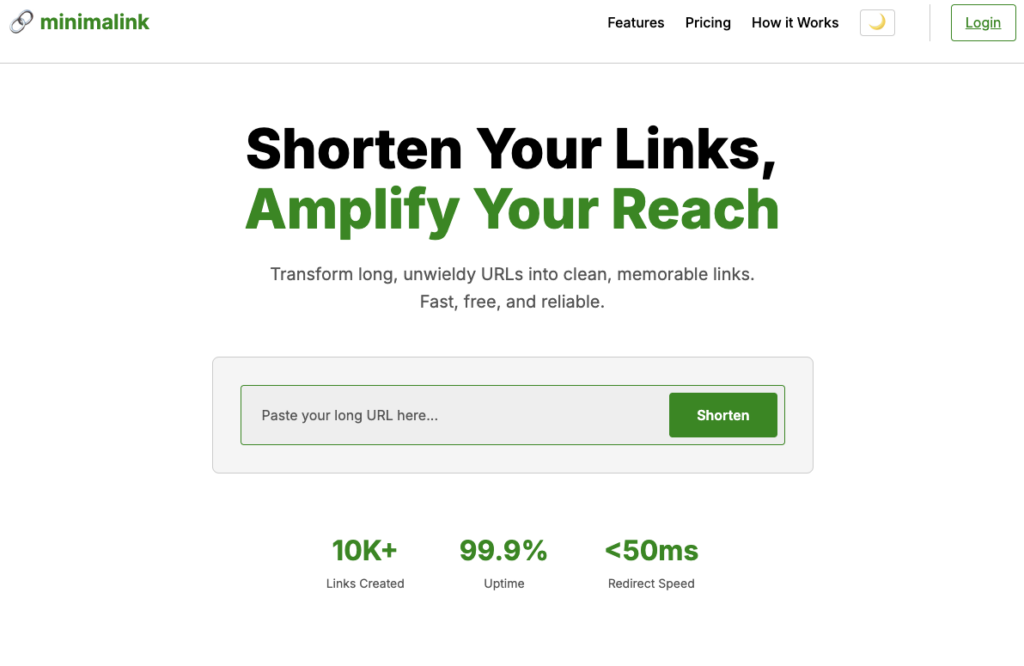
Minimalink - Shorten URLs, track clicks, see stats. Fast, free.
I needed url shortener. So I made one with Claude code. https://mnml.ink
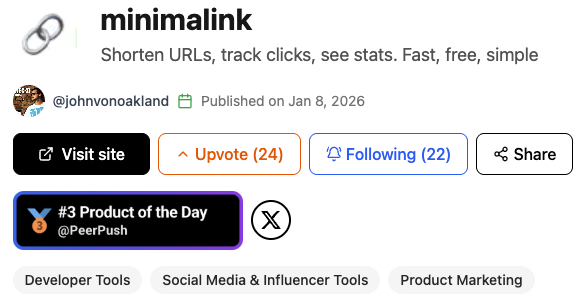
I was impressed with the result so I shared it on https://peerpush.net/p/minimalink and it quickly became 3rd product of the day!
mnml.ink — does what it says:
- Shorten URLs
- Generate QR codes
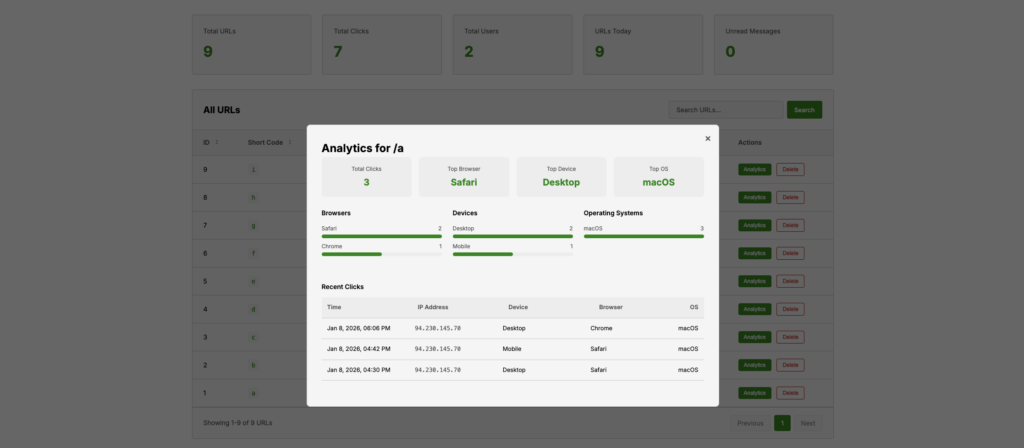
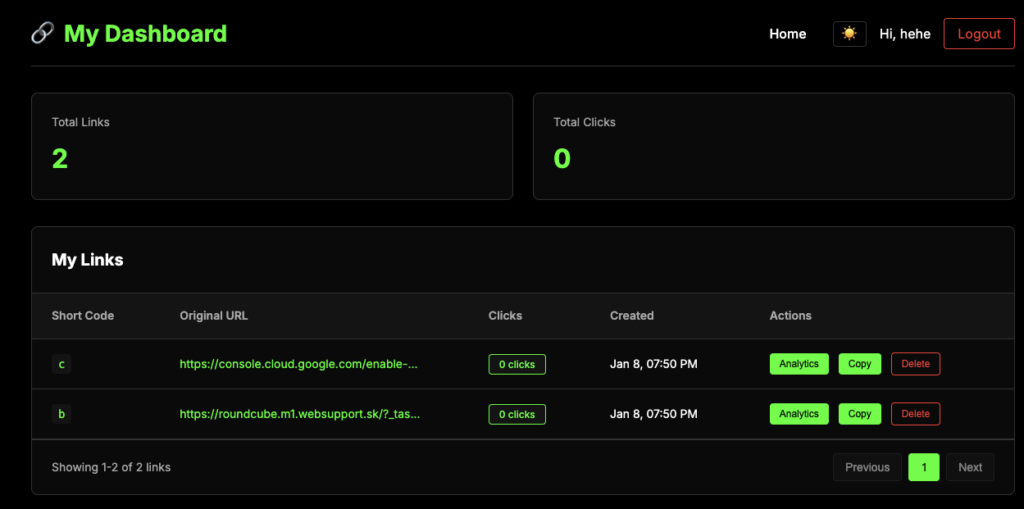
- Track clicks & basic stats
- No sign-up required for basic use
It's fast, free, and I tried to keep it as simple as possible.
Would love honest feedback — what features would make this actually useful for your workflow? Anything obviously missing?
minimalink is a modern URL shortener designed to be fast, reliable, and free to use. You can easily transform long, cumbersome URLs into short, shareable links in an instant. This tool helps you manage your digital presence more effectively by cleaning up links for social media, messaging, or documentation. It provides a simple and efficient way to streamline your online sharing experience.

Czech Real Estate Price Per M² Calculator
A Chrome extension that automatically calculates and displays the price per square meter for property listings on Czech real estate portals sreality.cz and reality.idnes.cz.
You can download it here https://github.com/ivanjurina/sreality-idnes-price-per-meter
Supported Websites
- sreality.cz - Czech Republic's largest real estate portal
- reality.idnes.cz - Popular real estate section of iDNES.cz
Installation
- Clone this repository or download the files
- Open Chrome and navigate to
chrome://extensions/ - Enable Developer mode (toggle in top right corner)
- Click Load unpacked
- Select the extension folder containing the files
- Visit sreality.cz or reality.idnes.cz
- The price per m² will automatically appear under each listing's price
How It Works
The extension automatically detects which website you're visiting and applies the appropriate parsing logic:
Screenshots
sreality.cz

*Price per m² shown below each listing on sreality.cz*
reality.idnes.cz

*Price per m² displayed on reality.idnes.cz listings*
Building a Modern AI Chat Interface: React + TypeScript Implementation
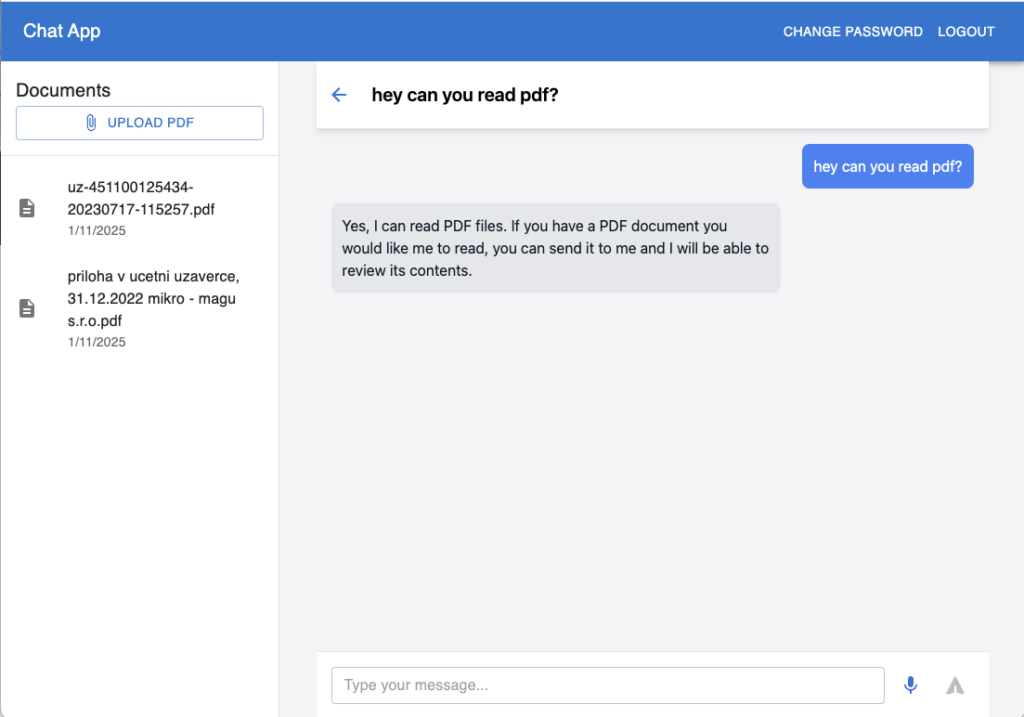
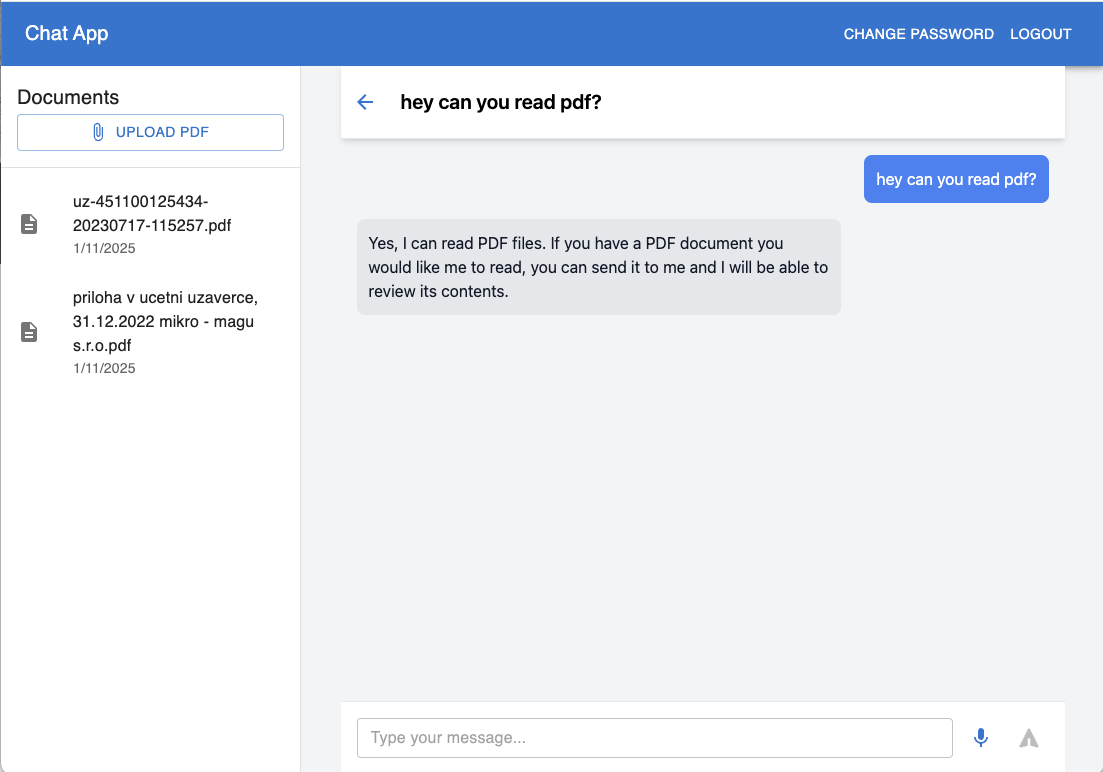
Built a clean React frontend that connects to my previous .NET backend project. The UI lets you chat with AI models (ChatGPT and Claude) while handling voice input and PDF document processing.
Key Features
- Voice-to-text conversion for natural conversations
- PDF document upload and analysis
- Real-time AI chat with streaming responses
- Clean Material-UI + Tailwind CSS interface
- Chat history management
Simple Setup
- Clone repo
npm install- Configure backend URL in
.env npm start
The UI is minimal but functional - single chat window with document sidebar, voice input button, and message history. Perfect for applications needing AI chat with document analysis capabilities.
Check out the code to see how it all fits together!
https://github.com/ivanjurina/chatgpt-claude-react-app